

MEXC Auto Margin Addition FAQ: What It Is, How It Works, and How to Use It
Key Takeaways
- Auto Margin Addition is an automated risk management feature for MEXC Futures users in isolated margin mode. It adds margin when a position approaches liquidation.
- Each margin addition equals the maintenance margin amount required for the position. The system can add margin up to 100 times and recalculates a more favorable liquidation price after each addition.
- Auto Margin Addition is available only in isolated margin mode, not cross margin mode.
- Before adding margin, the system first cancels unfilled orders associated with the position to release funds for the transfer.
- Auto Margin Addition can reduce the likelihood of liquidation, but positions may still be liquidated in extreme market conditions. Use it alongside a stop-loss strategy.
1. Auto Margin Addition Basics
1.1 What is margin?
In cryptocurrency Futures trading, margin is the funds a trader deposits to open and maintain a position. During sharp market fluctuations, the system may automatically close a position as the market price approaches its liquidation price, resulting in further losses. Margin management is a core skill for Futures traders and plays a key role in profitability and risk control.
1.2 What is Auto Margin Addition?
Auto Margin Addition is a MEXC feature that automatically adds margin to existing isolated margin positions. It increases the margin supporting a position to help prevent liquidation.
Once Auto Margin Addition is enabled, available margin in the account is automatically transferred to a position when it approaches the liquidation threshold. This helps move the liquidation price further away from the market price.
1.3 What does Auto Margin Addition do?
Auto Margin Addition helps reduce liquidation risk by automatically adding margin when a position approaches liquidation. The additional margin adjusts the liquidation price, giving the position more room to withstand adverse price movements. This reduces the need to manually add margin and continuously monitor the position.
2. How Auto Margin Addition Works
2.1 When is Auto Margin Addition triggered?
When an isolated margin position approaches its liquidation price, the system immediately transfers additional margin to the position. No manual action is required.
2.2 How much margin is added each time?
Each addition equals the amount needed to meet the position's maintenance margin requirement. The system adds margin incrementally, up to a maximum of 100 times. If the position still does not meet the required margin level after 100 additions, it will be liquidated.
2.3 Does the liquidation price change after margin is added?
Yes. After each margin addition, the system recalculates the liquidation price, moving it further away from the current market price and giving the position a larger buffer against liquidation.
2.4 Are open orders affected when Auto Margin Addition is triggered?
Yes. Before adding margin, the system first cancels unfilled opening orders associated with the position. This releases funds to ensure sufficient margin is available for the transfer.
2.5 Is Auto Margin Addition available in cross margin mode?
No. Auto Margin Addition is available only in isolated margin mode. In cross margin mode, all positions share the account's margin, so this feature is not needed.
3. How to Set Up Auto Margin Addition
3.1 How do I enable Auto Margin Addition on the MEXC website?
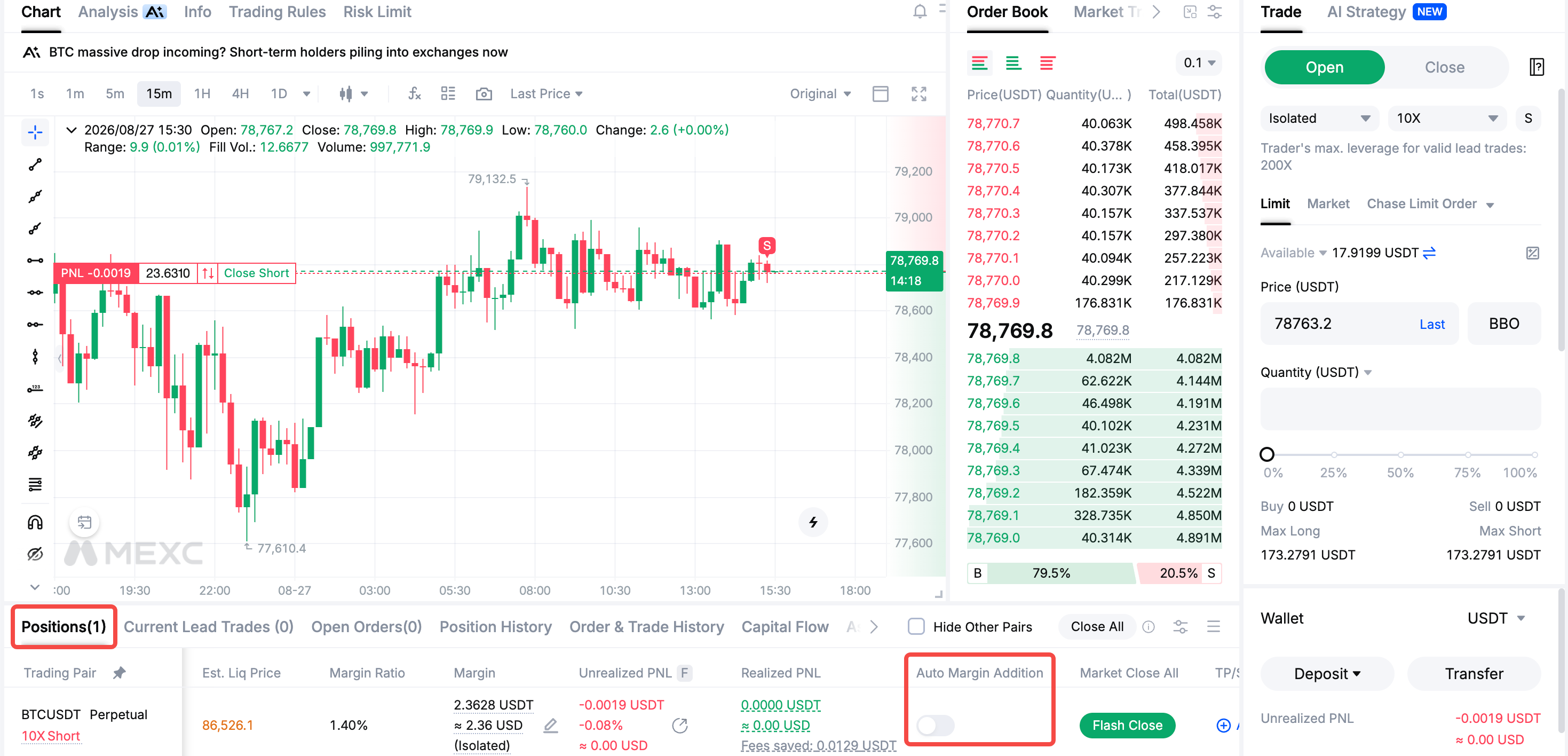
Go to the Futures trading page. In the Positions section at the bottom of the page, click the Auto Margin Addition toggle to turn it on.
3.2 How do I enable Auto Margin Addition on the MEXC App?
Open the Futures trading page. In the Positions section at the bottom of the page, tap the Auto Margin Addition toggle to turn it on.
3.3 Are there any additional fees for using Auto Margin Addition?
No. Enabling and using the feature does not incur any additional fees. Standard trading fees and funding fees still apply under the platform's rules. MEXC is currently running its 0-Fee Fest, which allows users to further reduce their trading costs.
4. Benefits and Risks of Auto Margin Addition
4.1 What are the benefits of enabling Auto Margin Addition?
1) Lower liquidation risk: The system automatically adds funds to help prevent premature liquidation during short-term market fluctuations.
2) Greater flexibility: Traders have more time to adjust their strategies and manage their positions.
3) Adjustedliquidation price: After margin is added, the system recalculates the liquidation price, giving the position a greater buffer against liquidation.
4) Automated risk management: The system adds margin automatically at critical moments, reducing the need for constant monitoring.
4.2 Can my position still be liquidated with Auto Margin Addition enabled?
Yes. The feature can reduce the likelihood of liquidation, but it cannot eliminate it. If the price continues to move against the position, the system will keep transferring funds from the available balance until it is depleted. In extreme market conditions, a position may still be liquidated even after margin has been added.
4.3 What is the worst-case outcome of using this feature?
In extreme market conditions, using this feature could result in the loss of all assets in the Futures account. The system continues transferring funds from the available balance to support the position. If market conditions keep worsening, the position may still be liquidated after the available balance is depleted. The feature should therefore be treated as an additional protective measure, not a substitute for risk management.
5. Strategies for Using Auto Margin Addition
5.1 How should I set my margin level when using Auto Margin Addition?
Traders should set their initial margin level according to their risk tolerance and trading strategy. Consider market volatility and trading experience when choosing a margin level that balances position protection with efficient use of capital.
5.2 Can Auto Margin Addition replace a stop-loss?
No. Auto Margin Addition cannot eliminate trading risk. It is a protective measure for positions approaching liquidation, not a substitute for risk management. Traders should set clear stop-loss levels and close positions promptly when the market price reaches those levels to help limit further losses.
5.3 Do I still need to monitor the market when using Auto Margin Addition?
Yes. Markets can change rapidly, and major positive or negative news may trigger sharp price movements. Traders should monitor market developments, assess their positions' risk exposure in light of significant news, and decide promptly whether to adjust margin levels or stop-loss levels.
5.4 How can I improve the way I use Auto Margin Addition?
Review trading performance regularly to assess how Auto Margin Addition has worked in practice. Use these findings to adjust trading strategies and feature settings, with the aim of improving risk control and overall profitability.
Auto Margin Addition is an important risk management tool offered by MEXC. Traders should understand how it works, configure its settings appropriately, and combine it with stop-loss strategies and market monitoring to support safer, more disciplined trading.