Creating a RealStocks Account FAQ: A Guide from Account Preparation to Three-Step VerificationCreating a RealStocks Account FAQ: A Guide from Account Preparation to Three-Step Verification
Category List
Cancel

Creating a RealStocks Account FAQ: A Guide from Account Preparation to Three-Step Verification

You can enable stock trading access in just three steps: log in to the MEXC App → go to the RealStocks page → complete the three-step verification required by MEXC's partner licensed broker. This guide walks you through each step and key reminders to help you quickly create your RealStocks account.

1. What materials do I need before creating a RealStocks account?


To make the account opening process smoother, we recommend preparing the following materials before you begin:
  • Valid identity document: A passport, ID card, or other government-issued identity document used to complete Advanced KYC Verification.
  • Proof of address: A utility bill, bank statement, or government-issued proof of residence issued within the past three months.
  • Stable network connection: We recommend using Wi-Fi to avoid interruptions during document upload, which may affect the review progress.

Once your materials are ready, you can follow the steps below to create your stock account.

2. How to access the RealStocks page


MEXC provides multiple access points. Whether you use the MEXC App or the web platform, you can quickly enter the RealStocks trading page.

App:
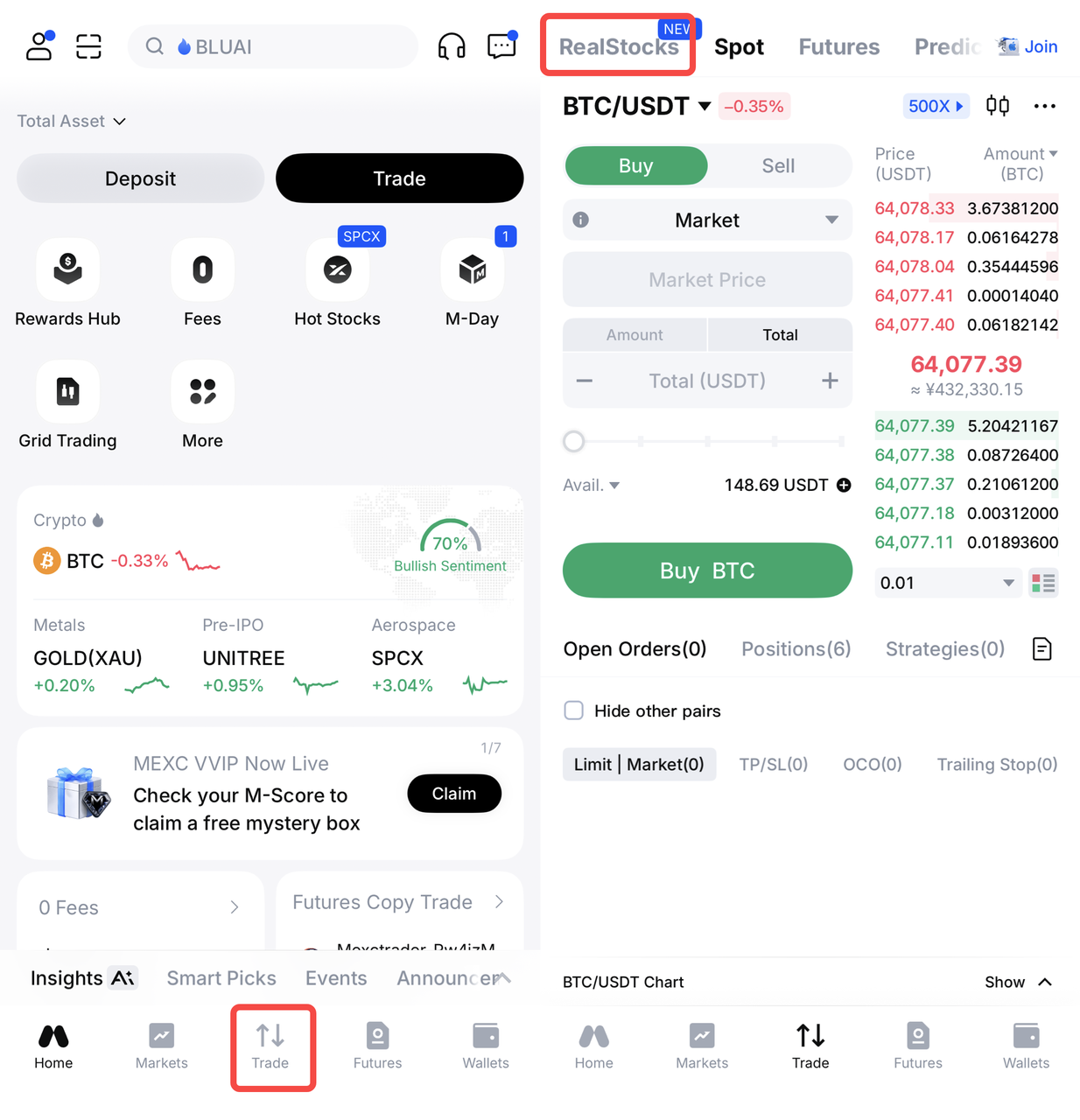
You can access the stock page through any of the following paths:
1. Open MEXC App → TradeRealStocks.
2. Open MEXC App → MoreSpotRealStocks.
3. Open MEXC App → WalletsRealStocks.


Web:
1. Open MEXC official websiteSpotRealStocks.
2. Open MEXC official websiteWalletsRealStocks.
3. Open MEXC official websiteMarketsRealStocksUS Stocks.


3. Complete three-step verification to create a RealStocks account


After entering the RealStocks page, carefully read and agree to the account opening agreements of the partner broker, then click Open Account. Next, you need to complete three verification steps in order: Advanced KYC Verification, proof of address, and risk assessment questionnaire. Once all three steps are approved, your RealStocks account will be successfully opened.


To meet regulatory compliance requirements and protect user funds, all three verification steps are mandatory and must be completed in a fixed order. The next verification step will only become available after the previous step has been approved.

When submitting your materials, please pay attention to the following points to avoid rejection due to details:
1. Advanced KYC Verification: Make sure the uploaded document is clear and complete, with all four corners visible. During facial recognition, choose a well-lit environment and avoid covering your face.
2. Proof of address: The name and address shown on the document must exactly match your KYC information, otherwise the review cannot be approved.
3. Risk assessment questionnaire: Please complete and submit the questionnaire in English, and ensure your answers accurately reflect your investment experience and risk tolerance.

4. How long does RealStocks account review take?


Under normal circumstances, Advanced KYC Verification and Proof of Address review can be completed within a few minutes to 24 hours. The exact review time depends on the clarity of the materials you submit and the current system queue.

5. What should I do if my review is rejected?


If any verification step is rejected, the system will display the specific reason for failure. You only need to modify the information or provide additional materials according to the prompt, then resubmit it. This will not affect your account.

6. Is there a fee for opening a RealStocks account?


Creating a RealStocks account is free of charge. However, trading fees may apply when you place actual trades. During the launch period, MEXC offers a limited-time 0-fee event for stock trading, allowing users to trade stocks without paying transaction fees during the campaign period. This significantly lowers the entry cost and makes it easier for more investors to experience the stock market.


Disclaimer:

The information provided herein is for informational and educational purposes only and does not constitute financial, investment, tax, or legal advice. MEXC is not a registered investment advisor or broker-dealer. All investment strategies and investments involve risk of loss. Any content contained herein should not be relied upon as advice or construed as providing recommendations of any kind. Always conduct your own research and consult with a licensed financial professional before making any investment decisions.

By participating in these investment activities, you risk losing ALL OR SUBSTANTIALLY ALL OF YOUR ASSETS. Please understand and evaluate the risk of trading and assess your risk tolerance carefully before conducting any trading or investment activities.

Creating a RealStocks Account FAQ: A Guide from Account Preparation to Three-Step Verification

You can enable stock trading access in just three steps: log in to the MEXC App → go to the RealStocks page → complete the three-step verification required by MEXC's partner licensed broker. This guide walks you through each step and key reminders to help you quickly create your RealStocks account.

1. What materials do I need before creating a RealStocks account?


To make the account opening process smoother, we recommend preparing the following materials before you begin:
  • Valid identity document: A passport, ID card, or other government-issued identity document used to complete Advanced KYC Verification.
  • Proof of address: A utility bill, bank statement, or government-issued proof of residence issued within the past three months.
  • Stable network connection: We recommend using Wi-Fi to avoid interruptions during document upload, which may affect the review progress.

Once your materials are ready, you can follow the steps below to create your stock account.

2. How to access the RealStocks page


MEXC provides multiple access points. Whether you use the MEXC App or the web platform, you can quickly enter the RealStocks trading page.

App:
You can access the stock page through any of the following paths:
1. Open MEXC App → TradeRealStocks.
2. Open MEXC App → MoreSpotRealStocks.
3. Open MEXC App → WalletsRealStocks.


Web:
1. Open MEXC official websiteSpotRealStocks.
2. Open MEXC official websiteWalletsRealStocks.
3. Open MEXC official websiteMarketsRealStocksUS Stocks.


3. Complete three-step verification to create a RealStocks account


After entering the RealStocks page, carefully read and agree to the account opening agreements of the partner broker, then click Open Account. Next, you need to complete three verification steps in order: Advanced KYC Verification, proof of address, and risk assessment questionnaire. Once all three steps are approved, your RealStocks account will be successfully opened.


To meet regulatory compliance requirements and protect user funds, all three verification steps are mandatory and must be completed in a fixed order. The next verification step will only become available after the previous step has been approved.

When submitting your materials, please pay attention to the following points to avoid rejection due to details:
1. Advanced KYC Verification: Make sure the uploaded document is clear and complete, with all four corners visible. During facial recognition, choose a well-lit environment and avoid covering your face.
2. Proof of address: The name and address shown on the document must exactly match your KYC information, otherwise the review cannot be approved.
3. Risk assessment questionnaire: Please complete and submit the questionnaire in English, and ensure your answers accurately reflect your investment experience and risk tolerance.

4. How long does RealStocks account review take?


Under normal circumstances, Advanced KYC Verification and Proof of Address review can be completed within a few minutes to 24 hours. The exact review time depends on the clarity of the materials you submit and the current system queue.

5. What should I do if my review is rejected?


If any verification step is rejected, the system will display the specific reason for failure. You only need to modify the information or provide additional materials according to the prompt, then resubmit it. This will not affect your account.

6. Is there a fee for opening a RealStocks account?


Creating a RealStocks account is free of charge. However, trading fees may apply when you place actual trades. During the launch period, MEXC offers a limited-time 0-fee event for stock trading, allowing users to trade stocks without paying transaction fees during the campaign period. This significantly lowers the entry cost and makes it easier for more investors to experience the stock market.


Disclaimer:

The information provided herein is for informational and educational purposes only and does not constitute financial, investment, tax, or legal advice. MEXC is not a registered investment advisor or broker-dealer. All investment strategies and investments involve risk of loss. Any content contained herein should not be relied upon as advice or construed as providing recommendations of any kind. Always conduct your own research and consult with a licensed financial professional before making any investment decisions.

By participating in these investment activities, you risk losing ALL OR SUBSTANTIALLY ALL OF YOUR ASSETS. Please understand and evaluate the risk of trading and assess your risk tolerance carefully before conducting any trading or investment activities.