Nightmare AI Review: AI Image Upscaler
⚠️ Affiliate Disclosure: CoinCodeCap may earn a commission when you sign up through links on this page. This doesn’t change our editorial views.
📋 How We Review: We evaluated Nightmare AI on image upscaling quality (Real-ESRGAN model), feature range, ease of use, pricing value, and comparison against free alternatives. Pricing verified against official Nightmare AI documentation.
Old family photos, low-resolution screenshots, scanned heirloom prints from before 2-megapixel cameras existed — at some point you’ll want to upscale an image without it looking like a stretched-out blur. Nightmare AI is one of the simpler tools in this category, web-based and powered by Real-ESRGAN (Enhanced Super Resolution Generative Adversarial Network) models capable of taking images up to 4K. If you’re already using a tool like Tonfotos to organize a family archive, an upscaler covers the restoration step that organization tools don’t touch.
⚡ TL;DR — Nightmare AI
- 🖼️ What it is: AI image upscaler powered by Real-ESRGAN — upscales photos, anime, and general images to 2K or 4K
- 💰 Pricing: Free (2 credits, limited) → Basic $9.90/month (50 credits) → Standard $29.90/3 months (250 credits)
- ⚡ Speed: 10–20 seconds per upscale
- ✅ Best for: Restoring old family photos, upscaling anime/cartoon stills, improving low-resolution digital images
- ⚠️ Note: Free plan is heavily limited — can’t upload files over 1MB or download results. Real usage requires a paid plan.
What Is an AI Image Upscaler?
An AI image upscaler uses machine learning to increase image resolution while improving — not just stretching — visible detail. The model is trained on millions of high-resolution images and learns to predict what detail should exist when it’s given a low-resolution input. The output looks sharper and more natural than traditional bicubic upscaling because the AI is generating plausible new pixels, not averaging existing ones. Modern AI upscalers also reduce noise and compression artifacts in the same pass, which is why they’re often the right tool for restoring badly-compressed phone-camera shots from a decade ago. This category sits alongside other AI image tools — see our roundup of AI headshot generators for portraits and AI tools for students for academic image work.
What Is Nightmare AI?
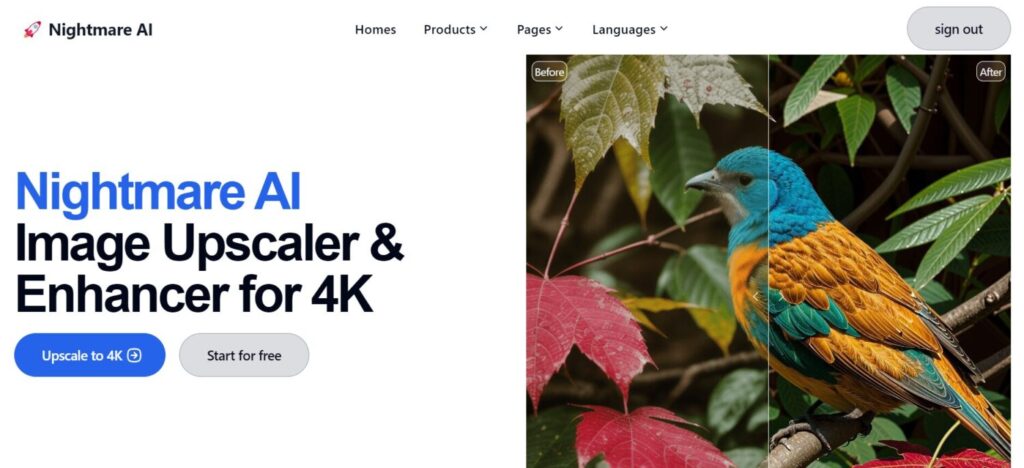
Nightmare AI is a web-based image upscaler powered by the nightmareai/Real-ESRGAN model — a super-resolution GAN that handles up to 4K output. It runs in the browser with no software install, processes a typical image in 10–20 seconds, and offers three specialized modes: photo enhancement, anime/cartoon upscaling, and general image upscaling. The interface is deliberately simple: upload, choose 2K or 4K, click upscale.
Key Features
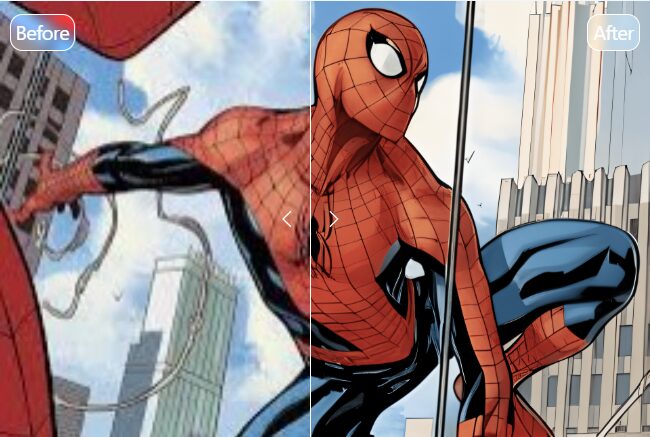
AI Photo Enhancer: Tuned for human faces and family photos. Useful for reviving old portraits, school photos, and anything where face clarity is the priority. The model has separate weighting for skin texture and hair detail, which is what separates it from a generic 4× upscale.
AI Anime Upscaler: Upscales blurry anime, cartoon, and comic frames to 4K while preserving line work and flat-color regions instead of forcing photographic textures onto them. Useful for wallpaper conversion, archiving classic animation, or print-resolution comic pages.
AI Image Upscaler: The general-purpose mode for nature shots, landscapes, product photos, and digital images that don’t fit the photo or anime models. Real-ESRGAN preserves natural tone and detail at the 4K target.
Additional features: Multilingual interface (English, French, Spanish, German, and more). Web-based — no download. 10–20 second processing time per image. 14-day money-back guarantee on paid plans.
How to Use Nightmare AI
- Visit nightmare.ai and create a free account
- You receive 2 free credits on signup
- Upload your image (under 10MB)
- Pick your output: 2K (1 credit) or 4K (2 credits)
- Wait 10–20 seconds for processing
- Download the enhanced image (paid plans only)
Pricing
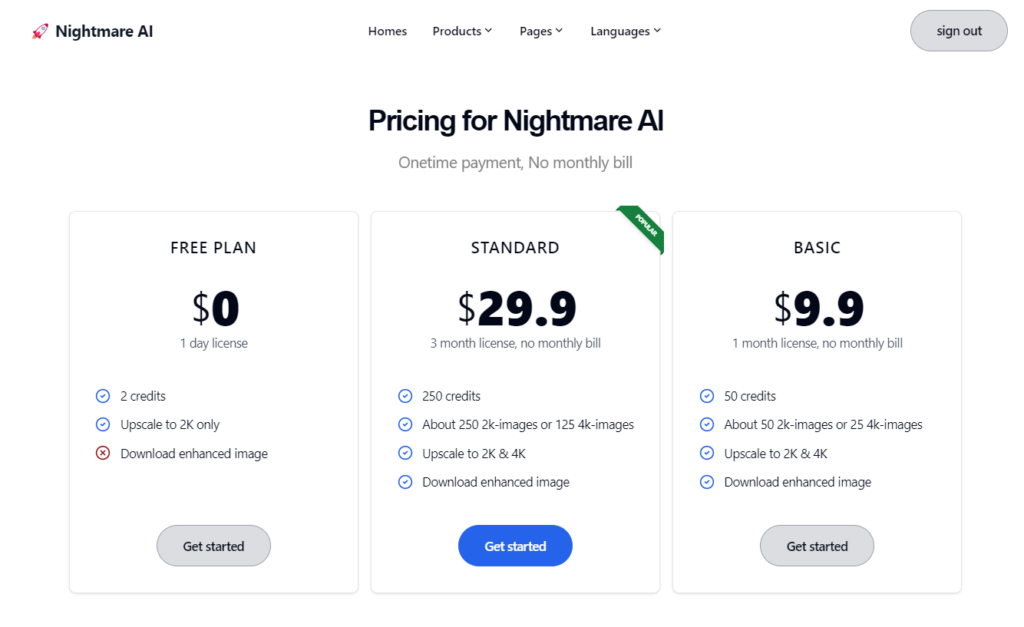
| Plan | Price | Credits | Limitations |
|---|---|---|---|
| Free | $0 | 2 credits | No 4K, no files over 1MB, no download of enhanced images |
| Basic | $9.90/month | 50 credits | Full 4K, downloadable — ~25 images at 4K or 50 at 2K |
| Standard | $29.90 / 3 months | 250 credits | Full access — ~125 images at 4K or 250 at 2K |
| 2K = 1 credit · 4K = 2 credits · 14-day money-back guarantee on paid plans | |||
The free plan’s biggest limitation isn’t credit count — it’s that you can’t download the enhanced output. That makes the free tier a quality preview only; any actual usage needs at least the Basic plan. The 14-day money-back guarantee makes Basic a low-risk way to test it on a batch of your own images before committing.
Benefits of AI Image Upscaling
AI upscalers improve on bicubic upscaling by predicting what detail should exist (not averaging neighbors), reducing noise and compression artifacts, sharpening edges intelligently, and improving color/contrast in the same pass. Practical use cases: restoring old family photos that exist only in low resolution, upscaling images downloaded at small dimensions, and improving screenshots for printing or large-screen display. For ongoing content workflows that pair upscaled images with AI video, our Pictory AI review covers the AI video side of the same pipeline.
Where Nightmare AI Fits in a Wider AI Toolkit
Nightmare AI is single-purpose — it does upscaling well and nothing else. Most users will pair it with other tools depending on the workflow. Family archive: Tonfotos for organization, Nightmare AI for restoring scans, then a video tool for creating shareable family-history content. Content creation: any AI image generator for sourcing visuals, Nightmare AI for upscaling them to print or 4K display resolution. For broader category context, see our roundup of the best AI tools for startups, which covers the productivity and content layers most teams build alongside an image-restoration tool like this one.
FAQs
How does Nightmare AI upscale images?
It uses Real-ESRGAN (Enhanced Super Resolution Generative Adversarial Network) models trained on large high-resolution datasets. The GAN architecture predicts what detail should exist at high resolution rather than just interpolating between existing pixels — producing sharper, more natural-looking results than traditional upscaling.
What types of images can Nightmare AI upscale?
Three modes: Photo Enhancer (faces, family photos, portraits), Anime Upscaler (preserves animation art style), and general Image Upscaler (landscapes, digital images, anything else). Maximum input: 10MB. Output: 2K or 4K.
Is the free plan actually usable?
The free plan is a preview, not a usable workflow. Two credits, no files over 1MB, no 4K, and — most importantly — no download of enhanced images. For real usage, Basic ($9.90/month, 50 credits) is the minimum viable plan. The 14-day money-back guarantee on Basic makes it low-risk to try before committing.
Bottom Line: Nightmare AI is a no-frills, web-based AI upscaler powered by Real-ESRGAN — well-suited for restoring old family photos, upscaling low-resolution images, and sharpening anime or cartoon stills. The 10–20 second processing time and clean interface make it accessible to non-technical users. The constraint is the credit-based pricing: the free tier is too limited for any real work, and 50 credits at $9.90/month means roughly 25 images at 4K — not a lot if you’re working through a large archive. For occasional upscaling of precious old photos: worth the cost. For bulk work, compare against free Real-ESRGAN desktop apps before subscribing — same model, no recurring fee, just more setup friction.


You May Also Like
From Telegram to Browser: How Banana Gun Built a Unified Trading Layer Across Five Chains
Robotics Automation Prototyping: Engineering Kinetic Agility into End-Effectors